Archive

Tuesday, April 29, 2014

Week8/Presentation Feedback - Intellectual Property

/The Creation of Gothic Architecture
Ricky, Dorothy Kar Yan, Maki, Stefan, David, Alan.


/The Last Suprematist Sculpture
Marina, Andrew.

/The Bus Stop of the Future
Martha, Anthony, Kerre, Darren, Daniel.

From today's presentations by three different groups, I have learned a lot about Intellectual Property. It's about how can we protect our design idea by law, as a final year architecture student, it's very important and useful knowledge for further work. 
One of the group's cartoonish video is  very interesting that combined the topic with the story.

Sunday, April 27, 2014

Week7/Individual Process - Skybox

Before I start to edit the skybox, I did another texture to development the terrain detail.
The rock texture makes terrain looks more reality.


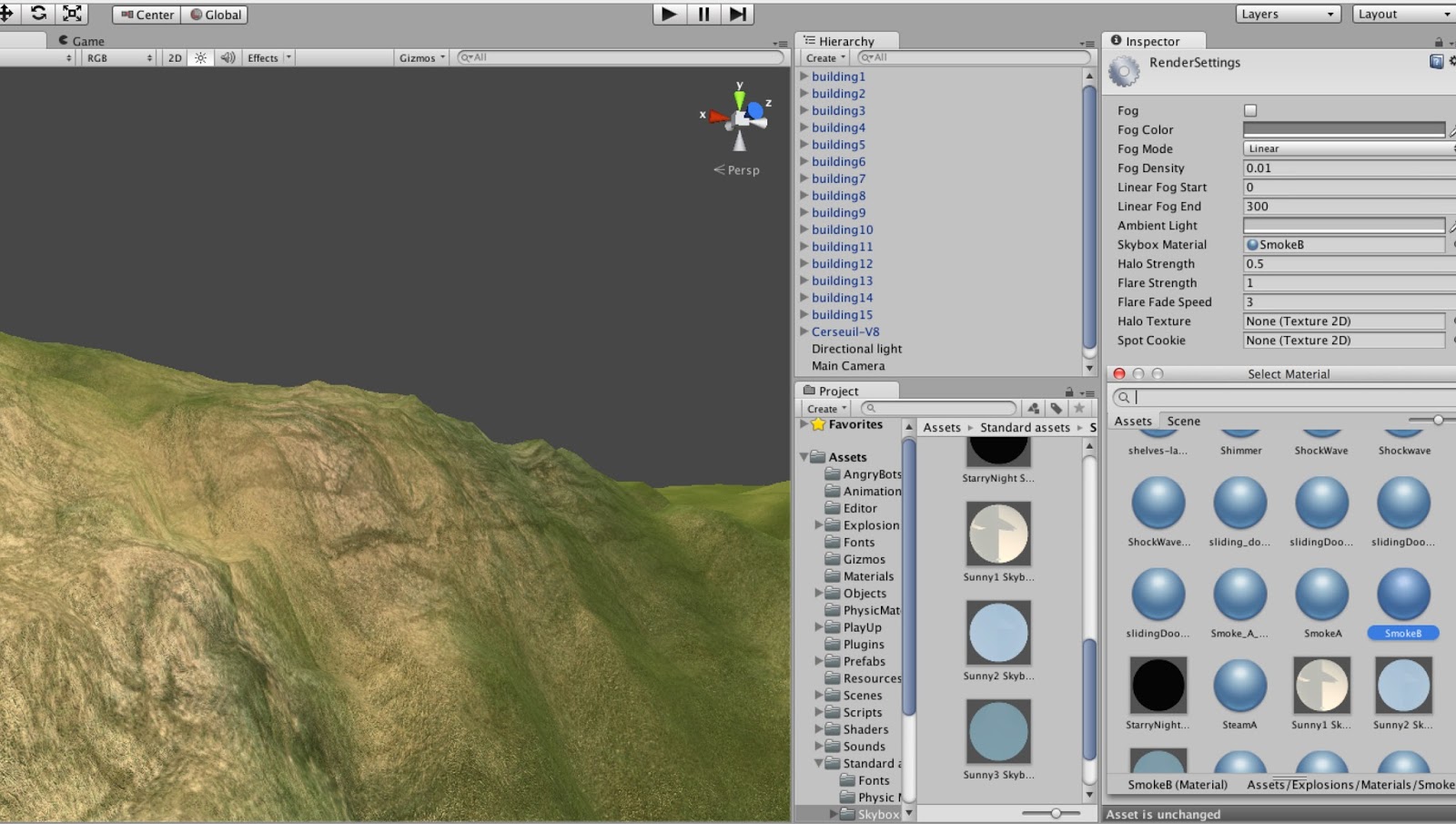
Then I started to edit the skybox by following this video from Youtube:


Basically I edited the sky texture in rendering setting in Unity. 


Then assign the default sky texture into the skybox.


For the next step, I'm going to do with the plants and surrounding environment of the church.

Week7/Individual Process - Texture & Shader

For this week, I basically doing lot of research about how to make cartoonish style of environment and realistic natural terrain. And start to do our own environment in unity with textures.
Heres are some reference image I found during the research. Personally like this kind of cartoonish architecture and environment style. I would like to try to set up the environment like this image in the following steps in needed. 


Cartoonish style shader of the building.
Reference image found online. 
Before to have further process of terrain making in World-Machine, I try to play around with terrain settings in Unity as tutorial. Here is the link of the tutorial I found online.
(tutorial of the terrain making)


Grass texture and normal map are found online.

Texture: https://www.filterforge.com/filters/4739-normal.html
Normal map of texture: https://www.filterforge.com/filters/4739.html

To make own texture in Unity, I firstly have to imported new Assets, then assign the texture to the terrain. Here is the screenshot of how the texture is worked with the terrain in Unity after imported.


In order to make the texture more reality, I did some shader settings. I made a new shader instead of the default one to make sure every setting going well with my own texture.


Here is the final outcome of the terrain texture. It's much more realistic with texture that have normal map and much better with specific shader setting.


In the next step, I'm going to have some more details setting of the terrain with plants and also the skybox.

Tuesday, April 15, 2014

Week6/Presentation Feedback - Communication

/The Creation of Gothic Architecture (my group)
Anthony, Bassel, Benjamin, Lauren, Lorrain, Theodore.


/The Bus Stop of the Future
Martha, Anthony, Kerre, Darren, Daniel.

/The Last Suprematist Sculpture
Marina, Andrew.

Though we do well for the video, but for the presentation content we have to be more careful with the referencing. Endnote have to be located within the content.


After other two groups present, I have learned some different parts about the Communication than our presentation didn't cover. Such as what can we get from good/bad communicate and what is the best way to communicate within different situations.

Tuesday, April 8, 2014

Week6/Group Presentation - Individual Work

Final presentation slides edit finished by me within Prezi.


For the presentation, I'm going to talk about 'communication within collaborate':


"It is crucial to identify the key factors of communication within collaboration for effectiveness.

-

Synchronous Communication

Initially (in our team), synchronous communication (verbal and non-verbal) takes place, where team objectives, roles and other information is shared directly – face to face in real-time. Communication within collaboration can be extended via messaging whether it’s throughout social networking such as Facebook or contacting the members directly to their personal phone number these are all tools of communication.
/Advantages
  • Verbal, synchronous communication allow the group to understand what is happening at that very instant. (How to use Unity, What Creation of Gothic Architecture is about)
  • It allows an immediate answer to a certain concern or issue a group member raises. (Something within Unity or Sketchup isn't working, Where the database is located, Images or historical facts of Cerseuil)
/Disadvantages
  • Team mate can feel pressured into giving an answer on the spot. (This coincides with language barriers, where some of the members are uncomfortable with the common language, which is English in our case)
  • Answer not necessary prepared well and not given at best potential. (At times, words may fail us and a more visually engaging form of communication is used to illustrate an idea across)
  • Might not have the correct resource with.

-

Asynchronous Communication

On the other hand, an asynchronous form takes place; this refers to a later reply. For example, sending an e-mail message; where one sends an e-mail and possibly gets a reply 1-12hours later. Which has time lag in between, whether it was an hour or twelve? Another example is where the reader has time to complete them.
/Advantages
  • Asynchronous communication is flexible. 
  • There is less pressure and can be completed at a more convenient time.
  • Allows the recipient to digest the information given, so the final response is improved in relation to context and perspective.  
/Disadvantages
  • It can lack a sense of immediacy so no immediate action given.
  • Crucial information being out of date once viewed.
In our case, we have touched on multiple forms of communication to complete our given tasks by the tutor as well as between the group and group designated tasks. It has made it more efficient and easier to comprehend. "
(content collected by group member)

Monday, April 7, 2014

Week6/Individual Process - Terrain

As the requirement of our clients, we need to build a 3D environment for church in Unity. In order to get better terrain(more detailed, more natural), I'm trying to use some different program to achieve better out comes.
 
I'm currently use a program named World-Machine, it's a powerful and flexible tool combines procedural terrain creation, simulations of nature, and interactive editing to produce realistic looking terrain quickly and easily. Here is the capture of what I currently have.
 
 
The way to use World-Machine is kind of like what I used to do with Flowchart in Cry Engine, so it's not very hard and won't spend too much time on .

 
 The final terrain could save as .RAW file then easily import to Unity.

Friday, April 4, 2014

Week5/Process - Group Presentation

-
After 3 hours group meeting today, we have done some part of the presentation slides. It's not finished yet,we'll keeping adding new content to improve it. I advised to use Prezi as present tool, here is the screenshot of the draft slides:


-
And we also finish record some videos about our project topic, though It's still need some more editing.